Scheduled termination
Schedule a pod to be deleted automatically at a future time. Cheap insurance against forgetting a kill overnight — billing stops the moment the pod is terminated.
Set it when deploying
On the Create Pod page, the Auto-Termination (Optional) field takes a number of hours. The pod will be deleted that many hours after deploy.
Pod will automatically terminate after specified hours.
This sets termination_hours on the pod. Leave the field blank if you want the pod to keep running until you delete it manually.
Set it on a running pod
From the pod detail page:
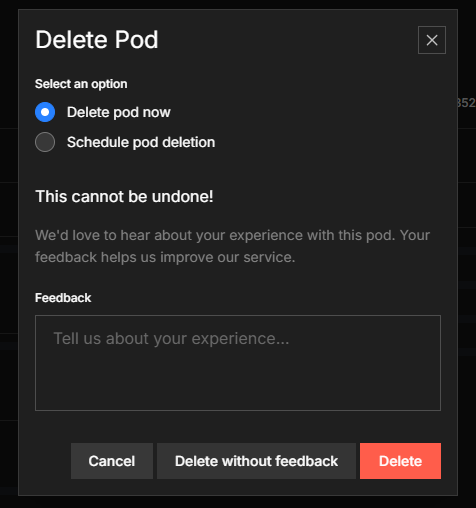
- Click DELETE (top-right action bar).
- In the menu, choose Schedule pod deletion.
- Pick a preset (1 h, 2 h, 3 h, 6 h, 12 h, 1 day) or pick a custom date and time.
The pod detail page now shows a "Scheduled to terminate at …" line, and a Remove Scheduled Terminate action lets you cancel.
Cancel a schedule
Pod detail page → Remove Scheduled Terminate. The pod returns to "until deleted" mode.
Notes
- Billing stops at the scheduled termination time — pods are billed per second, so you pay for the exact seconds up to the removal and nothing after it.
- You can't bulk-schedule multiple pods at once from the UI; do it per pod, or use the API in a loop.
- The schedule survives pod restarts — rebooting the pod from inside doesn't cancel the timer.
For agents and automation: API + CLI
# Schedule removal at a specific UTC datetime
curl -X POST https://lium.io/api/pods/<pod_id>/schedule-removal \
  -H "X-API-Key: $LIUM_API_KEY" \
  -H "Content-Type: application/json" \
  -d '{"removal_scheduled_at": "2026-05-01T12:00:00Z"}'

# Cancel a schedule
curl -X DELETE https://lium.io/api/pods/<pod_id>/schedule-removal \
  -H "X-API-Key: $LIUM_API_KEY"
The scheduled time lives on the pod object as removal_scheduled_at (ISO 8601 UTC). When you create a pod via API, set termination_hours on the create request to bake the schedule in at deploy time. CLI: bake the schedule in at create time with lium up --ttl or --until; manage existing schedules with lium schedules list / rm. Get an API key first.