Provider Payouts
For total-rewards math, see the Rewards section.
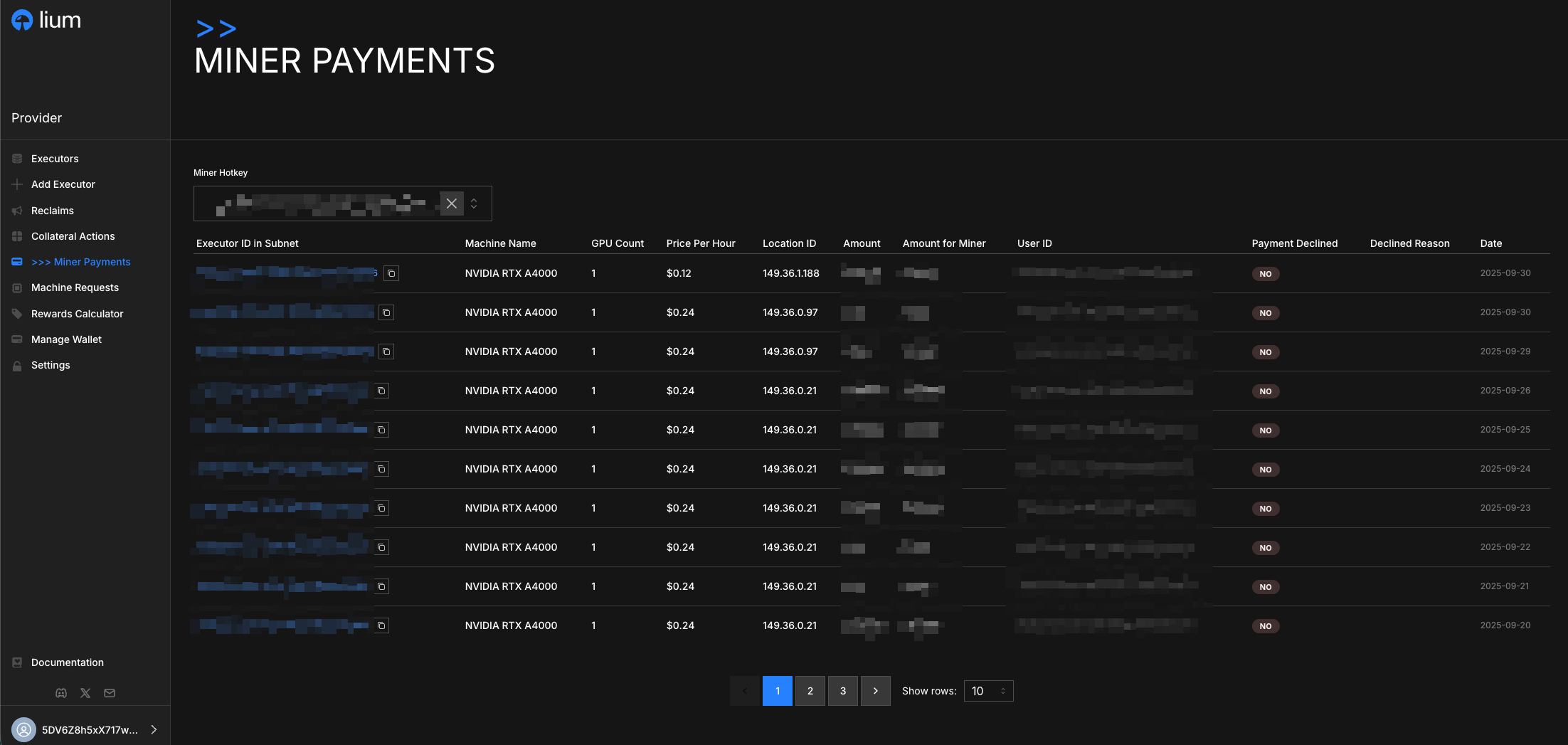
Track your earnings from GPU rental fees with detailed payout history, amounts, validator information, and node specifications.
What you actually earn
Total provider earnings on Subnet 51 are the sum of two streams:
- Subnet emission — standard Bittensor emission, paid in alpha and scaled by your validator score. It accrues as stake on your hotkey each tempo (~72 minutes), not through this payout page. The portal shows it on the Earnings page, with a per-epoch on-chain proof link; you can also track it on TaoMarketCap → Subnet 51.
- Rental fees — what renters pay for actual GPU-hour usage on your nodes. See Rental fees for the current provider share. Lium retains the remainder.
The Provider Payouts page on this site shows the rental-fee stream. Subnet emission flows through the standard Bittensor mechanism and is reported separately on the Earnings page, which adds the two streams together.
Overview
The Provider Payouts section displays your revenue from GPU rentals. The backend automatically calculates and distributes your portion of rental fees based on rental activity.
Rental fee distribution is delayed to allow validation, quality assurance, and the misbehavior penalty window to clear. See Payouts for the current delay value.
Daily Payout Display
The Provider Payouts page shows your earnings organized by day, providing a clear view of your daily revenue from GPU rentals. Each day's entry consolidates all payouts from your nodes for that specific date.
Payout Information
Each daily payout record includes:
- Date: The specific day for which earnings are displayed
- Total Daily Amount: Your combined earnings from all nodes for that day
- Payout Status: Current status of the daily payout (processed, pending, declined)
- Node Breakdown: Individual earnings from each node for that day
- Validator Information: Which validators were responsible for scoring your work
- Rental Activity: Summary of rental periods and GPU utilization for the day
Understanding Your Earnings
Your payouts are calculated based on:
- Rental Duration: How long your nodes were rented
- GPU Performance: The performance and availability of your nodes
- Validator Scoring: Scores assigned by validators for your node performance
- Market Rates: Current rental rates for your GPU types
Where payouts arrive
This section describes the rental-fee payout shown on this page. Subnet emission is a separate stream that accrues as alpha stake on your hotkey each tempo (~72 minutes) — see Earnings for how the portal reports it, and Payouts → Destination.
- Destination: Your coldkey — the same coldkey that registered the hotkey on Subnet 51. Rental-fee payouts are delivered as a daily stake transfer through the Subtensor
stake_transferAPI. - Currency: alpha (the SN51 dynamic-TAO token). Rental rates are listed in USD, but distributions settle in alpha at the prevailing rate.
- Mechanics: Automatic — there is no claim button and no minimum threshold. The backend pushes each day's rental earnings to your coldkey on the standard schedule.
- Schedule: A given day's rental earnings arrive on your coldkey after the rental day, once the validation and misbehavior windows have cleared (see Payouts for the current delay value). If misbehavior is recorded for that node on that day, the day's payout for that node is declined (see below).
If misbehavior is detected on a node during any day, the entire day's payment for that node will be declined. This ensures network quality and protects customers from poor service.
The main misbehavior trigger is bringing a node down while it has an active rental without using the supported maintenance flow. To avoid this, schedule maintenance through the Notice Period feature (Managing Nodes → Notice Period Management) — it notifies the renter in advance and protects the day's payout.